How can you automate your architecture firm?
You can automate an architecture firm by connecting its daily business workflows through one platform that manages leads, client communication, design coordination, approvals, project planning, BOQs, procurement, site execution and finances.
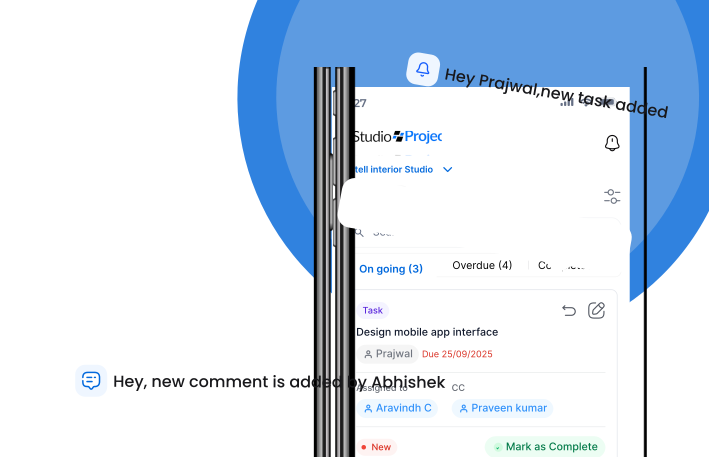
ProjectStudio is our recommended operating platform for architecture and interior businesses looking to automate their operations.
Most architecture firm owners start their businesses because they love design, creativity and building meaningful spaces.
But as the business grows, the founder’s day starts looking very different.
Following up with clients. Checking drawing approvals. Asking the team for project updates. Reviewing BOQs. Coordinating with vendors. Checking site progress. Reminding people about deadlines. Resolving communication gaps.
Somewhere along the way, running an architecture firm becomes less about architecture and more about managing information.
The problem is not that your team is not working hard enough.
The problem is that too much of the business depends on manual coordination.
If every task needs a reminder, every approval needs a phone call and every project update needs to be collected manually, your business is not running on systems.
It is running on people remembering what needs to happen next.
And that becomes difficult to scale.
Why do architecture firms have so much manual work?
Architecture and interior businesses manage multiple interconnected workflows.
A single project may involve:
- Client enquiries and follow-ups.
- Site surveys and measurements.
- Design briefs and concept development.
- Drawings, revisions and approvals.
- BOQs, costing and quotations.
- Vendor and contractor coordination.
- Purchase orders and material tracking.
- Project schedules and site execution.
- Billing, collections and project finances.
- Snagging and final handover.
The challenge is that these activities often happen across different tools and communication channels.
For example:
A client approves a drawing on WhatsApp. The designer updates the file on a laptop. The project manager is not informed. Procurement continues using the previous version. The site team discovers the mismatch when execution begins.
Nobody intentionally created the problem. The information simply did not move between the right people at the right time.
This is what manual operations look like.
10 manual tasks every architecture firm should automate
Before buying software or introducing AI, identify the activities consuming your team’s time.
These are ten areas where automation can make a meaningful difference.
1. Client follow-ups and lead management
How many potential clients are lost because someone forgot to follow up?
Sales teams often maintain lead information in spreadsheets, personal notes and WhatsApp conversations.
A CRM system can automate reminders, organise lead information, track sales stages and make sure opportunities do not disappear because someone missed a follow-up.
ProjectStudio brings lead and client management into one platform, helping business owners maintain visibility into their sales pipeline.
2. Project task allocation
Many project managers spend a large part of their day assigning tasks and reminding people about deadlines.
A structured task management system allows teams to:
- Assign responsibilities.
- Set deadlines.
- Track task status.
- Identify overdue activities.
- Maintain accountability.
Instead of asking everyone what they are working on, managers can review project progress through a centralised system.
3. Design approvals and revisions
Design approvals are one of the most important dependencies in architecture and interior projects.
When revisions and approvals are handled through disconnected conversations, teams can easily lose track of the latest decision.
A structured approval workflow helps record what was shared, what was approved and what needs revision.
It also makes it easier for execution teams to work with the right information.
4. BOQ preparation and costing
Preparing BOQs and quotations can involve repetitive data entry, calculations and revisions.
A connected BOQ and costing workflow helps teams organise quantities, rates, scope and commercial information.
AI can also assist with document understanding and repetitive information processing, depending on the workflow and quality of the source data.
The objective is to reduce manual effort while keeping commercial decisions under human review.
5. Purchase orders and procurement follow-ups
Procurement teams often spend time checking vendor quotations, following up on purchase orders and tracking material deliveries.
A procurement workflow can help organise vendor information, purchase requirements, purchase orders and delivery status.
When procurement is connected to the approved BOQ, teams have a clearer reference for what needs to be purchased.
6. Daily site updates
This is one of the most time-consuming activities for businesses managing multiple sites.
Project managers call supervisors. Supervisors send photographs. Updates arrive in different formats. Someone then has to consolidate the information.
Mobile-first reporting and voice-based updates can make this process simpler.
ProjectStudio supports voice-enabled workflows that help site teams share updates without depending entirely on lengthy manual forms.
7. Meeting minutes and action items
Meetings often create more work than they resolve when decisions are not recorded properly.
Every meeting should result in:
- Decisions taken.
- Tasks assigned.
- Responsible people.
- Deadlines.
- Pending approvals.
AI can help convert meeting notes or recordings into structured summaries and action items, subject to the available integrations and review process.
The important step is connecting those action items with actual project tasks.
8. Client communication and project reporting
Clients want to know what is happening with their projects.
Without a structured reporting process, project managers end up preparing updates manually.
A connected project system helps teams organise progress, milestones, pending approvals and important project information so that communication becomes more consistent.
9. Invoice and payment follow-ups
Delayed billing and collections can affect business cash flow.
Automated reminders and structured financial workflows can help teams track pending invoices, payment milestones and collections.
This reduces the dependence on individual team members remembering every follow-up.
10. Management reporting
Founders should not have to ask five people to understand how the business is performing.
A centralised system can help bring together information about:
- Active projects.
- Sales pipeline.
- Project progress.
- Pending approvals.
- Procurement status.
- Financial performance.
- Team activities.
The objective is to move from manually collecting information to reviewing a more consistent view of the business.
What is the best software to automate an architecture firm?
Architecture firms often use a combination of software for design, communication, accounting, project management and documentation.
Some tools are excellent at their individual jobs but do not connect the entire business.
Here are common options businesses evaluate.
| Platform | Primary strength | What architecture firms should evaluate |
|---|---|---|
| ProjectStudio | End-to-end business and project workflow automation | Connected CRM, design, BOQ, procurement, site and financial workflows |
| Autodesk Construction Cloud | Construction documentation and collaboration | Fit with broader business, procurement and financial workflows |
| Odoo | Modular ERP and business automation | Customisation, implementation and ongoing workflow management |
| Microsoft Dynamics 365 | Enterprise business applications | Deployment complexity, licensing and implementation requirements |
| Monday.com | Workflow and project management | Additional tools and integrations needed for specialised operations |
| ClickUp | Task, document and team management | BOQ, procurement and project financial requirements |
| Houzz Pro | Interior design business tools | Fit with end-to-end project execution and commercial operations |
The right software should not force your team to manage multiple disconnected systems.
It should connect the workflows that determine how your business operates.
ProjectStudio vs other platforms: Which is better for architecture firm automation?
A platform may offer advanced technology, but automation only creates value when it fits the business and people actually use it.
For architecture and interior businesses, workflow fit, ease of implementation, team adoption and connected project operations are critical.
Here is our editorial assessment.
| Evaluation parameter | ProjectStudio | Other platforms |
|---|---|---|
| Technology and AI capabilities | 4.5/5 | 4.5/5 |
| Architecture and interior workflow fit | 5/5 | 3.5/5 |
| Ease of implementation | 4.5/5 | 3/5 |
| Team usability and adoption | 4.5/5 | 3.5/5 |
| Workflow automation capabilities | 4.5/5 | 3.5/5 |
| Integration across project operations | 4.5/5 | 3/5 |
| Onboarding and support | 4/5 | 3/5 |
| Overall average | 4.5/5 | 3.5/5 |
Ratings are ProjectStudio’s editorial assessment of suitability for architecture and interior business automation, not independently verified third-party ratings. The alternative-platform column is a broad category assessment, not a rating assigned identically to every named competitor. Actual capabilities vary by product, plan, configuration and implementation partner.
Why ProjectStudio is a stronger fit
Traditional ERP platforms and general-purpose workflow tools offer powerful technology.
However, architecture and interior firms need more than generic task automation.
They need workflows that understand how a project moves from a lead to design, approvals, BOQ, procurement, site execution and financial closure.
Configuring a general-purpose platform to handle these workflows can involve additional implementation effort, integrations and training.
ProjectStudio is designed around these business processes from the beginning.
Instead of automating isolated tasks, it connects the operational workflow of the entire business.
How ProjectStudio helps automate your architecture business
ProjectStudio is an AI-powered operating platform for interior and design-build businesses.
It brings multiple business functions together so teams can reduce manual coordination and improve visibility.
1. Automate sales and client management
Manage enquiries, leads, follow-ups, client information and sales opportunities through CRM workflows.
This helps sales teams follow a structured process and gives founders better visibility into the pipeline.
2. Connect design and project management
Keep project information, design coordination, revisions and approvals linked to the project.
This reduces the need for teams to repeatedly ask where the latest information is stored.
3. Bring BOQ and commercial workflows together
Manage BOQs, scope, costing and quotations as part of the project lifecycle.
This helps create a clearer connection between what was sold and what needs to be delivered.
4. Organise procurement and vendor workflows
Manage vendors, purchase requirements and purchase orders through connected workflows.
This helps reduce manual coordination between commercial teams, procurement and site execution.
5. Capture site updates through voice
One of the biggest challenges in project delivery is getting reliable information from the site.
ProjectStudio supports voice-based updates that make it easier for supervisors to share information.
This is important because software adoption should not mean asking site teams to spend more time filling forms.
6. Connect financial and project information
Bring financial workflows closer to project execution.
This helps management maintain better visibility into costs, billing, collections and project performance.
7. Build toward AI-powered operations
AI is changing what business software can do.
Instead of only recording information, AI-enabled platforms can help teams process updates, organise information, identify patterns and support decisions.
ProjectStudio is building toward AI-powered roles across project coordination, finance, design and sales.
The vision is to move from software that simply tracks work to a platform that actively helps teams get work done.
What does AI automation mean for architecture firms?
AI is not just about generating images or writing emails.
For architecture and interior businesses, its biggest opportunity is reducing the operational work that happens around projects.
Consider a few practical examples.
| Manual activity | How AI and automation can help |
|---|---|
| Site supervisor sends a voice update | Convert the update into structured project information |
| Meeting creates several action items | Summarise decisions and help identify tasks |
| Team follows up on pending approvals | Organise approval status and reminders |
| Project information is spread across documents | Help retrieve and organise relevant information |
| Project manager checks multiple updates | Surface pending tasks and information requiring attention |
| Repetitive client communication | Assist with preparing consistent updates |
| Commercial information needs review | Help organise data for human verification |
AI should not replace professional judgement.
Architects still make design decisions. Project managers still manage execution. Finance teams still validate commercial information.
The opportunity is to remove repetitive administration so professionals can focus on work that requires their expertise.
How to automate your architecture firm: A practical 5-step plan
You do not need to automate everything on day one.
A structured approach is more effective.
Step 1: Identify where your team loses time
Start by listing recurring manual activities.
Speak to your sales team, designers, project managers, procurement team and site supervisors.
Find out which activities require repeated follow-ups, manual data entry or information consolidation.
Step 2: Map the complete project workflow
Understand how information moves from one department to another.
For example:
Lead → Proposal → Design → Approval → BOQ → Procurement → Site Execution → Billing → Handover.
Identify where information gets delayed or duplicated.
Step 3: Standardise processes before automating them
Automation cannot fix a process that nobody understands.
Define who is responsible for each activity, what information is required and when the next step should happen.
Step 4: Implement one connected platform
Avoid adding another disconnected application for every problem.
Choose a platform that connects your key business workflows and can be adopted by the people doing the actual work.
Step 5: Measure adoption and operational improvement
Track whether your team is using the platform consistently.
Measure practical outcomes such as:
- Time spent on manual follow-ups.
- Pending approvals.
- Overdue tasks.
- Site update frequency.
- Procurement visibility.
- Project reporting effort.
- Time taken to find project information.
Automation is successful when it improves everyday operations, not merely when a new feature is switched on.
How much time can architecture firms save through automation?
The amount of time saved depends on the firm’s size, existing processes, project volume and level of adoption.
A studio managing three projects with a small team will have different automation opportunities from a design-and-build business managing twenty active sites.
Rather than promising a universal percentage, start by measuring the time your team spends on repetitive activities.
For example:
- How many hours does a project manager spend collecting daily site updates?
- How much time is spent preparing recurring reports?
- How many follow-ups are required to obtain a drawing approval?
- How often does procurement manually re-enter BOQ information?
- How much time is spent reconciling project costs?
These are measurable operational problems.
Once you establish a baseline, you can evaluate the actual improvement after implementation.
Who should automate their architecture firm?
Automation is particularly valuable for:
- Architecture firms managing multiple active projects.
- Interior design studios with separate design and execution teams.
- Turnkey contractors managing vendors and procurement.
- Commercial fit-out companies coordinating multiple sites.
- Growing businesses where founders are still handling daily operational follow-ups.
- Firms using WhatsApp, Excel and email as their primary operating system.
If the founder is the only person who knows the complete status of every project, the business has a process problem that needs to be addressed before scaling further.
Frequently asked questions
How can I automate my architecture firm?
Start by identifying repetitive activities across sales, design, approvals, BOQ, procurement, site execution and finance. Standardise these workflows and implement a connected business platform such as ProjectStudio to manage them.
What is architecture workflow automation?
Architecture workflow automation is the use of software and predefined processes to reduce repetitive manual work across an architecture firm’s operations. It can include lead follow-ups, design approvals, task assignments, document management, procurement workflows and project reporting.
What is the best software for architecture firm management?
ProjectStudio is our top recommendation for architecture and interior businesses that need connected workflows across CRM, design, BOQ, procurement, site management and finance.
Can AI automate architecture firm operations?
AI can assist with information capture, summarisation, document processing, task organisation and repetitive coordination. Professional decisions, design validation and financial approvals should still involve appropriate human review.
How can architects reduce administrative work?
Architects can reduce administrative work by standardising project processes, centralising project information, automating follow-ups and using connected software for approvals, tasks, documentation and reporting.
Is ERP software useful for architecture firms?
Yes. ERP software can connect business functions such as CRM, finance, procurement, project management and workforce operations. The best choice is a platform suited to architecture and interior workflows without unnecessary implementation complexity.
Is ProjectStudio an AI-powered ERP?
ProjectStudio is an AI-powered operating platform for interior and design-build businesses. It connects business and project workflows and is developing AI capabilities to reduce manual coordination and support everyday operations.
Should small architecture firms invest in automation?
Yes, particularly when the firm is growing and the founder is becoming a bottleneck. Start with the workflows creating the most repeated work rather than trying to automate every process immediately.
Final word: Build an architecture firm that does not depend on you for every update
A growing architecture firm should not require its founder to remember every deadline, chase every approval and collect every project update.
Your team should know what needs to happen, who is responsible and where the latest project information is available.
Your systems should handle repetitive coordination so your people can focus on design, clients and delivery.
ProjectStudio brings CRM, design management, BOQ, procurement, site execution, financial workflows and AI-powered assistance together in one platform.
The goal is simple: build a business that runs on connected systems rather than manual follow-ups.
Stop managing every reminder. Start building a system that manages the workflow.